
Js

1.数组

数组的常用方法

1. map

遍历数组。

1
2
3
4
5
6
var list = ["a", "b", "c", "d", "e"];
list.map(function (value, index) {
// console.log(value);//value是list的元素
// console.log(index);//index就是list的索引
console.log("第" + (index + 1) + "个元素是" + value);
});

2. push

在结尾追加元素。

1
2
3
4
var list = ["a", "b", "c", "d", "e"];
//push 在结尾追加元素
list.push("f");
console.log(list);

3. sort

排序。

*数值:从小到大排序。

字符串:按首字母从 a~z 来排序。

1
2
3
4
var list = [1, 3, 6, 5, 2];
// sort 排序,从小到大
list.sort();
console.log(list);

4. filter

过滤器。newList = list.filter(function (item) {}item是数组的每个元素

例子 - 将数组中大于等于 3 的元素放到新的数组

1
2
3
4
5
6
7
8
var list = [1, 3, 6, 5, 2];
//定义一个新数组,将大于等于3的元素放到新的数组,return返回才实现过滤的效果,item是数组里的每个元素
var newList = list.filter(function (item) {
if (item >= 3) {
return item;
}
});
console.log(newList); // [3, 6, 5]

5. join

连接数组。

不加参数时,默认加逗号。

1
2
3
var list = ["a", "b", "c"];
var str = list.join();
console.log(str); //a,b,c

实现 abc,在 join 里面加参数,空字符串可以设成空的连接符

1
2
var str = list.join("");
console.log(str); //abc

实现 a+b+c

1
2
var str = list.join("+");
console.log(str); //a+b+c

6.字符串split 方法

split 是字符串的拆分方法。

split 不设参数时,默认生成一个数组。

1
2
3
var str = "banana";
var list = str.split();
console.log(list); // ["banana"]

空字符串会拆分字符串

1
2
var list = str.split("");
console.log(list); // ["b","a","n","a","n","a"]

按字符来拆分

1
2
var list = str.split("n"); //把 n 当成连接符来拆分
console.log(list); // ["ba","a","a"]

例子 - 把日期 “2021-8-15” 按 ”-“ 来拆分

1
2
3
var str = "2021-8-15";
var list = str.split("-");
console.log(list); //["2021", "8", "15"]

7.结合数组与对象

1
2
3
4
5
var list = [
{ name: "小明", age: 2, sex: "男" },
{ name: "小红", age: 2, sex: "女" },
{ name: "小亮", age: 2, sex: "男" },
];

获取数据:list[0].name

1
2
3
4
//获取数组里第一个对象的年龄
console.log(list[0].age);
//获取数组里第一个对象的名字
console.log(list[0].name);

例子 - 找出所有男同学,放入一个新的数组。

方法 1 - 数组 filter 过滤器

1
2
3
4
5
6
7
8
9
10
11
var list = [
{ name: "小明", age: 2, sex: "男" },
{ name: "小红", age: 2, sex: "女" },
{ name: "小亮", age: 2, sex: "男" },
];
var newList = list.filter(function (item) {
if (item.sex === "男") {
return item;
}
});
console.log(newList);

方法 2 - 数组 push 添加

1
2
3
4
5
6
7
8
9
10
11
12
13
var list = [
{ name: "小明", age: 2, sex: "男" },
{ name: "小红", age: 2, sex: "女" },
{ name: "小亮", age: 2, sex: "男" },
];

var newList = [];
for (var i = 0; i < list.length; i++) {
if (list[i].sex === "男") {
newList.push(list[i]);
}
}
console.log(newList);

2.Es6

模板字符串

反引号 ``

  1. 支持换行。

    1
    2
    3
    4
    let str = `hello 
    world`;
    console.log(str); //hello
    // world
  2. 支持嵌入变量。
    ${}
    连接字符串

    1
    2
    3
    4
    5
    6
    7
    let year = "2020";
    let month = "10";
    let date = "10";
    //2020年10月10日
    // let result = year + "年" + month + "月" + date + "日";
    let result = `${year}${month}${date}日`;
    console.log(result);

解构赋值

  1. 数组的解构赋值。
    [n,m]
1
2
3
4
5
//   let n = 10;
// let m = 20;
let [n, m] = [10, 20];
console.log(n);
console.log(m);
  • 例子 - 交换。让 n=20,m=10。
    定义一个临时变量,先把 n 放到 temp 里,再把 m 赋值给 n,最后再把 temp 赋值给 n。

    • 方法一
    1
    2
    3
    4
    5
    6
    7
    8
    let n = 10;
    let m = 20;
    let temp;
    temp = n;
    n = m;
    m = temp;
    console.log(n); // 20
    console.log(m); // 10
    • 方法二(解构赋值)
    1
    2
    3
    4
    5
    let n = 10;
    let m = 20;
    [n, m] = [m, n];
    console.log(n); // 20
    console.log(m); // 10
  1. 对象的结构赋值(常用)。

    1
    2
    3
    4
    5
    6
    //   let name = "xiaoming";
    // let age = 10;
    let { name, age } = { name: "xiaoming", age: 10 };
    // let { age, name } = { name: "xiaoming", age: 10 }; //不会影响数据
    console.log(name); // xiaoming
    console.log(age); // 10
    1
    2
    3
    4
    5
    6
    7
    8
    9
    let xm = { name: "xiaoming", age: 10 };
    // function getName(obj) {
    // return obj.name;
    // }
    function getName({ name }) {
    return name;
    }
    let result = getName(xm);
    console.log(result);
  2. 通过解构赋值传递参数。

3.函数

1.闭包

闭包函数:声明在一个函数中的函数,叫做闭包函数。

闭包:内部函数总是可以访问其所在的外部函数中声明的参数和变量,即使在其外部函数被返回之后。

闭包的特性: 内部函数未执行完,外部函数即使执行完成,外部函数中的变量也不会被销毁。

自己总结:在不需要展示内部变量的情况下,调用到内部函数

1
2
3
4
5
6
7
function fun1() {
function fun2() {
console.log("I'm fun2");
}
return fun2;
}
const f = fun1(); //fun1的运行结果是fun2

利用闭包实现了代码的封装。

1
2
3
4
5
6
7
8
9
10
11
function fun1() {
let n = 10;
let m = 20;
function fun2() {
return n + m;
}
return fun2;
}
const f = fun1(); //fun1的运行结果是fun2
const result = f();
console.log(result);

代码封装

ES5 的一个模块化的语法。

1
2
3
4
5
6
7
8
const module = (function () {
let a = 10;
let b = 20;
function add() {
return a + b;
}
return add;
})();

2.箭头函数

作用: 简化写法。

1
2
3
4
5
const add = (x) => {
return x * x;
};
// 再次简化
const add = (x) => x * x;
1
2
3
4
5
6
7
8
9
10
const fun = function (x) {
return x * x;
};
//简化
const fun = (x) => {
return x * x;
};
//简化
// 参数 返回值
const fun = (x) => x * x;

例子 - 每秒输出一次名字

1
2
3
4
5
6
7
8
9
10
11
12
13
14
15
16
const cat = {
name: "miaomiao",
// sayName() {
// let self = this
// setInterval(function () {
// console.log(self.name);
// }, 1000)
// }
sayName() {
//window调用的setInterval
setInterval(() => {
console.log(this.name);
}, 1000);
},
};
cat.sayName();

使用 function 定义的函数, this 取决于调用的函数。

使用箭头函数, this 取决于函数定义的位置。

箭头函数和普通函数的this 指向不同。

普通函数指向的是调用该函数的对象。

箭头函数:在哪里定义,this 就指向谁。

4.面向对象

ES5 构造函数

构造函数的函数名,首字母大写

构造函数是用来创建对象用的。

function Dog(){}

1
2
3
4
5
6
7
// 构造函数
function Dog(name, age) {
this.name = name;
this.age = age;
}
var dog = new Dog("旺柴", 2); // 创建了一个对象,狗类的实例。
console.log(dog.name);

原型对象

通过设置构造函数的prototype属性,可以扩展构造函数生成的对象。
通过原型对象,为构造函数生成的对象赋予新的方法。

Dog.prototype.sayName = function () {};
Array.prototype.sayHello = function () {
console.log(你好,我的长度是${this.length}!);
}
let arr = [1, 2, 3, 4, 5, 1, 2, 3];
arr.sayHello();

1
2
3
4
5
6
7
8
9
10
11
12
function Dog(name, age) {
this.name = name;
this.age = age;
}
Dog.prototype.sayName = function () {
console.log(`我的名字是${this.name}`);
};
// 创建了一个对象,狗类的实例。
var dog = new Dog("旺柴", 2);
var bigDog = new Dog("二哈", 3);
dog.sayName();
bigDog.sayName();

原型链(继承)

Dog.prototype = new Animal()

1
2
3
4
5
6
7
8
9
10
11
12
13
14
15
16
17
18
19
20
function Animal(name) {
this.name = name;
}
Animal.prototype.sayName = function () {
console.log(`你好,我是${this.name}`);
};

Animal.prototype.sayHello = function () {
console.log("hello");
};

function Dog(name) {
this.name = name;
}

Dog.prototype = new Animal();

var dog = new Dog("旺柴");
dog.sayName();
dog.sayHello();

ES6 面向对象语法

Class 关键字

constructor (ES6 的构造函数)

1
2
3
4
5
6
7
8
9
10
11
12
13
14
class Dog {
//Es6的构造函数
constructor(name, age) {
this.name = name;
this.age = age;
}

sayName() {
console.log(`我是${this.name}`);
}
}

let dog = new Dog("旺柴", 2);
dog.sayName();

继承

extends 关键字

super

1
2
3
4
5
6
7
8
9
10
11
12
13
class Animal {
constructor(name) {
this.name = name;
}
sayName() {
console.log(`我是${this.name}`);
}
}
// Es6 继承 extends关键字
class Dog extends Animal {}

let dog = new Dog("旺柴");
dog.sayName();

1
2
3
4
5
6
7
8
9
10
11
12
13
14
15
16
17
18
19
20
21
class Animal {
constructor(name) {
this.name = name;
}
sayName() {
console.log(`我是${this.name}`);
}
}
// Es6 继承 extends关键字
class Dog extends Animal {
constructor(name, age) {
//父级的属性 super关键字
super(name);
// 子级的就用this 关键字
this.age = age;
}
}

let dog = new Dog("旺柴", 2);
dog.sayName(); //我是旺柴
console.log(dog.age); //2

5.Dom节点

1.设置样式

element.style.color

element.style.backgroundColor

通过 click、mouseenter、mouseleave 事件控制样式。

例子 - 设置 .box 的样式

1
2
3
4
5
6
7
8
9
10
11
let divBox = document.querySelector(".box");
// 鼠标移入元素
divBox.onmouseenter = function () {
//console.log(this);// <div class="box"></div>
// js 多个单词是用驼峰命名。css 多个单词是斜杠连接。
this.style.backgroundColor = "blue";
};
// 鼠标移出元素
divBox.onmouseleave = function () {
this.style.backgroundColor = "red";
};

例子 - 设置 button 的样式

1
2
3
4
5
6
//
let btn = document.querySelector("button");
// 点击事件监听函数
btn.onclick = function () {
this.style.backgroundColor = "yellow";
};

2.设置属性

element.src

element.id

例如

img.src="images/1.png"

点击数字列表切换图片

3.通过 class 属性设置样式

element.className

点击原始、设置激活的背景色

例 1 - 将 h1 元素的类名改成”active”。

HTML 代码

1
<h1 class="title">hello world</h1>

JS 代码

1
2
3
let h1 = document.querySelector("h1");
h1.className = "active";
// console.log(h1.className);// title

例 2 - 点击 h1 时将 h1 的背景色设成红色。

HTML 代码

1
<h1 class="title">hello world</h1>

JS 代码

1
2
3
4
let h1 = document.querySelector("h1");
h1.onclick = function () {
this.className = "active";
};

例 3 - 点击 h2 时选中(红色背景色),再点击就取消选中(默认背景色)。

HTML 代码

1
2
3
4
<h2>hello world</h2>

JS 代码

1
2
3
4
5
6
7
8
9
10
let h2List = document.querySelectorAll("h2");
for (let i in h2List) {
h2List[i].onclick = function () {
if (this.className === "active") {
this.className = "";
} else {
this.className = "active";
}
};
}

4.节点操作

  • 创建元素节点:createElement

  • 创建文本节点:createTextNode

  • 添加节点:appendChild

  • 删除节点:removeChild

例如,制作水果列表的添加与删除。

例 1 - 【增】通过 input 文本框添加 li 元素。

HTML 代码

1
2
3
<input type="text" name="" id="" />
<button>按钮</button>
<ul></ul>

JS 代码

1
2
3
4
5
6
7
8
9
10
let btn = document.querySelector(`button`);
let ul = document.querySelector(`ul`);
let inp = document.querySelector("input");
btn.onclick = function () {
let value = inp.value;
let li = document.createElement("li");
let txt = document.createTextNode(value);
ul.appendChild(li);
li.appendChild(txt);
};

例 2 - 【删】删除已有的 li 元素。

HTML 代码

1
2
3
4
5
<ul class="fruitList">
<li>香蕉</li>
<li>苹果</li>
<li>鸭梨</li>
</ul>

JS 代码

1
2
3
4
5
6
7
8
let ul = document.querySelector(`ul`);
let list = document.querySelectorAll(".fruitList li");

for (let i in list) {
list[i].onclick = function () {
ul.removeChild(this);
};
}

以上内容编写于 2021 年 9 月 5 日 23 点 53 分。

5.事件对象

事件监听函数的形参可以获取事件对象。

通过事件对象可以获取鼠标坐标。

  1. 获取 x 坐标:e.clientX;
  2. 获取 y 坐标:e.clientY;

例 1 - 获取红色方块中鼠标点击的坐标。

HTML 代码

1
<div class="box"></div>

CSS 代码

1
2
3
4
5
.box {
width: 200px;
height: 200px;
background-color: red;
}

JS 代码

1
2
3
4
5
6
7
let box = document.querySelector(".box");
box.onclick = function (e) {
// ClientX、ClientY获取X、Y坐标。
console.log("(" + e.clientX + "," + e.clientY + ")");
console.log(e.clientX);
console.log(e.clientY);
};

例 2 - 随鼠标显示图片的大图。

HTML 代码

1
2
3
4
5
6
7
8
<!-- 小图盒子 -->
<div class="smallPicList">
<img src="images/1.png" alt="" />
<img src="images/2.png" alt="" />
<img src="images/3.png" alt="" />
</div>
<!-- 大图盒子 -->
<div class="bigPicList"></div>

CSS 代码

1
2
3
4
5
6
7
8
9
10
11
12
13
.smallPicList img {
width: 320px;
height: 160px;
}

.bigPicList {
position: absolute;
}

.bigPicList img {
width: 640px;
height: 320px;
}

JS 代码

1
2
3
4
5
6
7
8
9
10
11
12
13
14
15
16
17
18
19
20
21
22
23
// 获取节点 - 小图盒子里所有小图
let imgList = document.querySelectorAll(`.smallPicList img`);
// 获取节点 - 大图盒子
let bigpicList = document.querySelector(`.bigPicList`);
for (let i in imgList) {
// imgList[i].src 是每个小图的路径
imgList[i].onmouseenter = function () {
bigpicList.innerHTML = `<img src="${this.src}" alt="" />`;
};
imgList[i].onmouseleave = function () {
//空字符串
bigpicList.innerHTML = ``;
};
}
// 获取节点 - 小图盒子
let smallPicList = document.querySelector(`.smallPicList`);
smallPicList.onmousemove = function (e) {
let x = e.clientX;
let y = e.clientY;
// 因为获取的坐标是数字,所以要另外加px像素单位。
bigpicList.style.top = y + 10 + `px`;
bigpicList.style.left = x + 10 + `px`;
};

6.事件

1.*事件绑定

  1. addEventListener(“eventType”,function(){})

    1
    2
    3
    4
    5
    6
    7
    8
    9
    10
    11
    12
    13
    14
    15
    <button>按钮</button>

    <script>
    let btn = document.querySelector("button");
    // addEventListener 在同一元素上的同一事件类型添加多个事件,不会被覆盖。
    btn.addEventListener("click", function () {
    console.log("hello world");
    });
    btn.addEventListener("click", function () {
    console.log("hello script");
    });
    // 执行结果如下:
    // hello world
    // hello script
    </script>
  2. element.onEventType = function(){}

    1
    2
    3
    4
    5
    6
    7
    8
    9
    10
    11
    12
    13
    14
    <button>按钮</button>

    <script>
    let btn = document.querySelector("button");
    // onEventType 会被下一个同一事件类型的事件覆盖。
    btn.onclick = function () {
    console.log("hello world");
    };
    btn.onclick = function () {
    console.log("hello script");
    };
    // 执行结果如下:
    // hello script
    </script>

两者区别:

  1. addEventListener 在同一元素上的同一事件类型添加多个事件,不会被覆盖。

  2. addEventListener 可以设置元素在捕获阶段触发事件,而 onEventType 不能。

应用场景:修改别人代码、添加功能的时候用addEventListener会方便很多。

2.事件流

三个 div 嵌套,都绑定 click 事件,点击最内层的元素,事件如何执行。—— (b).

a:只执行最内层

b:从内到外都执行

c:从外到内都执行
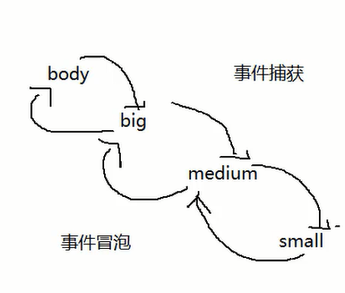
image-20210909001917857

3.事件捕获与事件冒泡

默认情况下,事件会在冒泡阶段执行。

addEventListener(eventType,fun,boolean);

默认 false:冒泡阶段触发,true:捕获阶段触发。

例 1 - 三个 div 嵌套,都绑定 click 事件,点击最内层的元素。

HTML 代码

1
2
3
4
5
<div class="big">
<div class="medium">
<div class="small"></div>
</div>
</div>

CSS 代码

1
2
3
4
5
6
7
8
9
10
11
12
13
14
15
16
17
.big {
width: 300px;
height: 300px;
background-color: red;
}

.medium {
width: 200px;
height: 200px;
background-color: yellow;
}

.small {
width: 100px;
height: 100px;
background-color: blue;
}
  • 在事件冒泡阶段触发。

    JS 代码

    1
    2
    3
    4
    5
    6
    7
    8
    9
    10
    11
    12
    13
    14
    15
    16
    17
    let big = document.querySelector(".big");
    let medium = document.querySelector(".medium");
    let small = document.querySelector(".small");
    big.addEventListener("click", function () {
    console.log("Hi,I'm big");
    });
    medium.addEventListener("click", function () {
    console.log("Hi,I'm medium");
    });
    small.addEventListener("click", function () {
    console.log("Hi,I'm small");
    });
    // 在事件冒泡阶段触发。
    // 执行结果如下:
    // Hi,I'm small
    // Hi,I'm medium
    // Hi,I'm big
  • 在事件捕获阶段触发。

    1
    2
    3
    4
    5
    6
    7
    8
    9
    10
    11
    12
    13
    14
    15
    16
    17
    18
    19
    20
    21
    22
    23
    24
    25
    26
    27
    28
    29
    let big = document.querySelector(".big");
    let medium = document.querySelector(".medium");
    let small = document.querySelector(".small");
    big.addEventListener(
    "click",
    function () {
    console.log("Hi,I'm big");
    },
    true
    );
    medium.addEventListener(
    "click",
    function () {
    console.log("Hi,I'm medium");
    },
    true
    );
    small.addEventListener(
    "click",
    function () {
    console.log("Hi,I'm small");
    },
    true
    );
    // 在事件捕获阶段触发。
    // 执行结果如下:
    // Hi,I'm big
    // Hi,I'm medium
    // Hi,I'm small

事件对象扩展

4.阻止事件冒泡

e.stopPropagation();

阻止事件冒泡执行。让外层的事件不被执行。

例 1 - 三个 div 嵌套,都绑定 click 事件,点击最内层的元素。

HTML 代码

1
2
3
4
5
<div class="big">
<div class="medium">
<div class="small"></div>
</div>
</div>

CSS 代码

1
2
3
4
5
6
7
8
9
10
11
12
13
14
15
16
17
.big {
width: 300px;
height: 300px;
background-color: red;
}

.medium {
width: 200px;
height: 200px;
background-color: yellow;
}

.small {
width: 100px;
height: 100px;
background-color: blue;
}

JS 代码

1
2
3
4
5
6
7
8
9
10
11
12
13
14
15
16
17
let big = document.querySelector(".big");
let medium = document.querySelector(".medium");
let small = document.querySelector(".small");
big.addEventListener("click", function () {
console.log("Hi,I'm big");
});
medium.addEventListener("click", function () {
console.log("Hi,I'm medium");
});
small.addEventListener("click", function (e) {
console.log("Hi,I'm small");
e.stopPropagation(); //阻止事件冒泡
});
// // 在事件冒泡阶段触发。
// // 三个 div 嵌套,都绑定 click 事件,点击最内层的元素,事件从内到外都执行。
// // 执行结果如下:
// // Hi,I'm small

例 2 - 点击一个按钮,显示一个容器盒子。点击容器,容器背景颜色改变。点击容器中的按钮,容器隐藏。

HTML 代码

1
2
3
4
<button class="show">显示</button>
<div class="box">
<button class="close">关闭</button>
</div>

CSS 代码

1
2
3
4
5
6
.box {
width: 200px;
height: 200px;
background-color: yellow;
display: none;
}

JS 代码

1
2
3
4
5
6
7
8
9
10
11
12
13
let show = document.querySelector(`.show`);
let box = document.querySelector(`.box`);
let close = document.querySelector(`.close`);
show.onclick = function () {
box.style.display = "block";
};
close.onclick = function (e) {
box.style.display = "none";
e.stopPropagation(); // 阻止事件冒泡,阻止隐藏盒子的时候将盒子变色。
};
box.onclick = function () {
box.style.backgroundColor = "red";
};

5.事件默认行为

去掉事件默认行为。

  1. e.preventDefault();
  2. return false;

例 1 - 为一个可以跳转到百度的 a 标签设置点击事件。

HTML 代码

1
<a href="http://www.baidu.com/">baidu</a>

JS 代码

1
2
3
4
5
6
let a = document.querySelector(`a`);
a.onclick = function (e) {
console.log("hello world");
e.preventDefault(); //阻止元素的默认行为,如果不阻止的话会执行完输出hello world然后跳转网页。
// return false; // 也可以阻止元素的默认行为。
};

以上内容编写于 2021 年 9 月 9 日 01 点 29 分。

6.*事件委托

通过e.target 将子元素的事件委托给父级处理。

例 1 - 实现一个水果列表,让后添加的元素也可以被删除。

HTML 代码

1
2
3
4
5
6
7
<input type="text" name="" id="" />
<button>add</button>
<ul class="fruit-list">
<li>banana</li>
<li>apple</li>
<li>pear</li>
</ul>

JS 代码

1
2
3
4
5
6
7
8
9
10
11
12
13
14
15
16
17
let btn = document.querySelector("button");
let ul = document.querySelector(`.fruit-list`);
let inp = document.querySelector(`input`);
// 添加
btn.onclick = function () {
let value = inp.value;
let li = document.createElement(`li`);
let txt = document.createTextNode(value);
li.appendChild(txt);
ul.appendChild(li);
};
// 删除
ul.onclick = function (e) {
// 事件委托,不管是后加还是先加的都可以绑定到ul。
// console.log(e.target);
ul.removeChild(e.target);
};

7.事件类型

  1. 鼠标事件
  2. 键盘事件
  3. 触屏事件

8.键盘事件

e.keyCode

键盘的每个按键都有绑定的键码。

例如,通过以下代码输出不同按键的键码。

1
2
3
document.onkeydown = function (e) {
console.log(e.keyCode);
};

例 1 - 通过上下左右键控制元素移动。

偏移量

左偏移量 上偏移量 右偏移量 下偏移量
offsetLeft offsetTop offsetRight offsetDown

HTML 代码

1
<div class="box"></div>

CSS 代码

1
2
3
4
5
6
7
8
.box {
width: 100px;
height: 100px;
background-color: red;
position: absolute;
top: 100px;
left: 100px;
}

JS 代码

1
2
3
4
5
6
7
8
9
10
11
12
13
14
15
16
17
18
19
20
21
22
23
24
25
let box = document.querySelector(`.box`);
document.onkeydown = function (e) {
let code = e.keyCode;
switch (code) {
case 37:
// 左移
box.style.left = box.offsetLeft - 5 + "px";
break;
case 38:
console.log("上");
// 上移
box.style.top = box.offsetTop - 5 + "px";
break;
case 39:
console.log("右");
// 右移
box.style.left = box.offsetLeft + 5 + "px";
break;
case 40:
console.log("下");
// 下移
box.style.top = box.offsetTop + 5 + "px";
break;
}
};

7.计时器

1.setTimeout

例 1 - 2 秒后输出 Hello world 点击停止按钮停止计时器

1
2
3
4
5
6
7
8
let timer = null;
document.querySelector('button').onclick = function() {
console.log("stop")
clearTimeout(timer);
}
timer = setTimeout(() => {
console.log("Hello world");
}, 2000);

例 2 - 3 秒后跳转到百度

1
2
3
setTimeout(() => {
location.href = "http://www.baidu.com" // z注意要写http:// 或者https://
}, 3000);

2.防抖与节流

解决性能问题,开发中常会遇到。
防抖:对于短时间内多次触发事件的情况,可以使用防抖停止事件持续触发。
节流:防止短时间内多次触发事件的情况,但是间隔事件内,还是需要不断触发。
例如:window.onscroll 事件,input 输入搜索内容(当你一直输入的时候不会自动搜索内容,当你停止输入一会后才会自动搜索)

1.防抖 (debounce)

多次触发事件的时候它一次也不会执行,等事件结束了才会执行。

例如,鼠标滚轮滚动事件不会连续触发

1
2
3
4
5
6
7
8
9
10
let timer = null;
window.onscroll = function() {
if (timer !== null) {
clearTimeout(timer);
}
timer = setTimeout(() => {
console.log("hello world");
timer = null;
}, 2000);
}

2.节流(throttle)

多次触发事件的时候每隔 x 秒会执行一次。
例如,鼠标滚轮滚动的事件按时间间隔触发

1
2
3
4
5
6
7
8
9
10
let mark = true;
window.onscroll = function() {
if (mark) {
setTimeout(() => {
console.log("hello world");
mark = true;
}, 2000)
}
mark = false;
}

3.返回顶部效果

  1. window.onscroll事件:滚动条滚动事件
1
2
3
window.onscroll = function() {
console.log("hello world");
};
  1. document.documentElement.scrollTop: 页面滚动位置距离顶部距离
  2. window.scrollTo(0,0):让页面滚动条返回至顶部。
    window.scrollTo(0,0) 的 x 代表的是横向的滚动条,y 代表的是竖向的滚动条。

8.Bom

1.对象成员

  1. window 对象 (全局对象)
  2. screen 对象包含有关用户屏幕的信息
  3. location 对象用于获得当前页面的地址(URL),并把浏览器重定向到新的页面。
  4. history 对象包含浏览器的历史。
  5. navigator 对象包含有关访问者浏览器的信息。

screen 对象

2.window

window 对象是全局对象,所有在浏览器可以直接使用的方法,都是 window 对象的方法。例如:

  1. 计时器方法
  2. 弹出框方法

3.弹出框

  1. alert
  2. prompt
  3. confirm
    在开发应用当中,一般不使用系统自带的弹出框,移动端可能会被屏蔽。

4.location

  1. location.href - 属性返回当前页面的 URL - “https://www.baidu.com
  2. location.hostname - 主机的域名 -“baidu.com”
  3. location.pathname - 当前页面的路径和文件名 “/s”
  4. location.port - 端口 - “8080”
  5. location.protocol -协议 - “https:”

页面跳转 location.href = "http://www.baidu.com" ;

5.navigator

例如 navigator.userAgent ,可以获取浏览器 UA。它可以应用到切换 PC 移动端布局。